





Where's your Alibaba Model Studio (Bailian) token spend going?
Your Bailian bill is one number — you can't tell which app or model is burning the most, or why it jumped this month. Here's how to break Alibaba Model Studio (Bailian) token cost down by model, application, and input/cached/output, attribute it by cost unit, and see Volcengine, Huawei, Tencent, and Baidu Qianfan in one place too.
 MofCloud
 You’re running LLMs on Alibaba Cloud Model Studio (Bailian), and at month-end the bill is one number. Which app is burning the most? Which model costs the most? Why is it up 30% this month? Good luck breaking that apart.
This post shows how to break Bailian’s token cost apart — by model, by app, down to the token type — attribute it to a team, and (as a bonus) see your other Chinese AI platforms in the same place (using MOF as the example).
The short answer
- Bailian token cost can be broken down by model, by application, and by input / cached / output, and attributed by cost unit to a team or project.
- Not just Bailian: Volcengine (Doubao), Huawei, Tencent, and Baidu Qianfan work the same way — and you can see them across accounts and platforms in one view.
- Not just AI: tokens are one line on your bill — seen inside your whole cloud bill, you finally know how much AI actually costs.
- Below, Bailian as the worked example.
What the native console shows, and where it falls short
Bailian’s console and the Alibaba Cloud billing center show basic usage and spend. But when you actually sit down to do cost analysis, a few things get painful (check against your own console):
- Figuring out which app / agent costs the most usually means manually decoding instance IDs;
- Seeing how much cache saved you, or whether output tokens are the real driver, means splitting tokens by type;
- Attributing an app’s spend to a team / project for showback takes manual work;
- Having multiple Bailian accounts, or also running Volcengine / Qianfan, and wanting it all in one place.
That’s exactly what the rest of this post covers.
How to break Bailian’s tokens apart (with MOF)
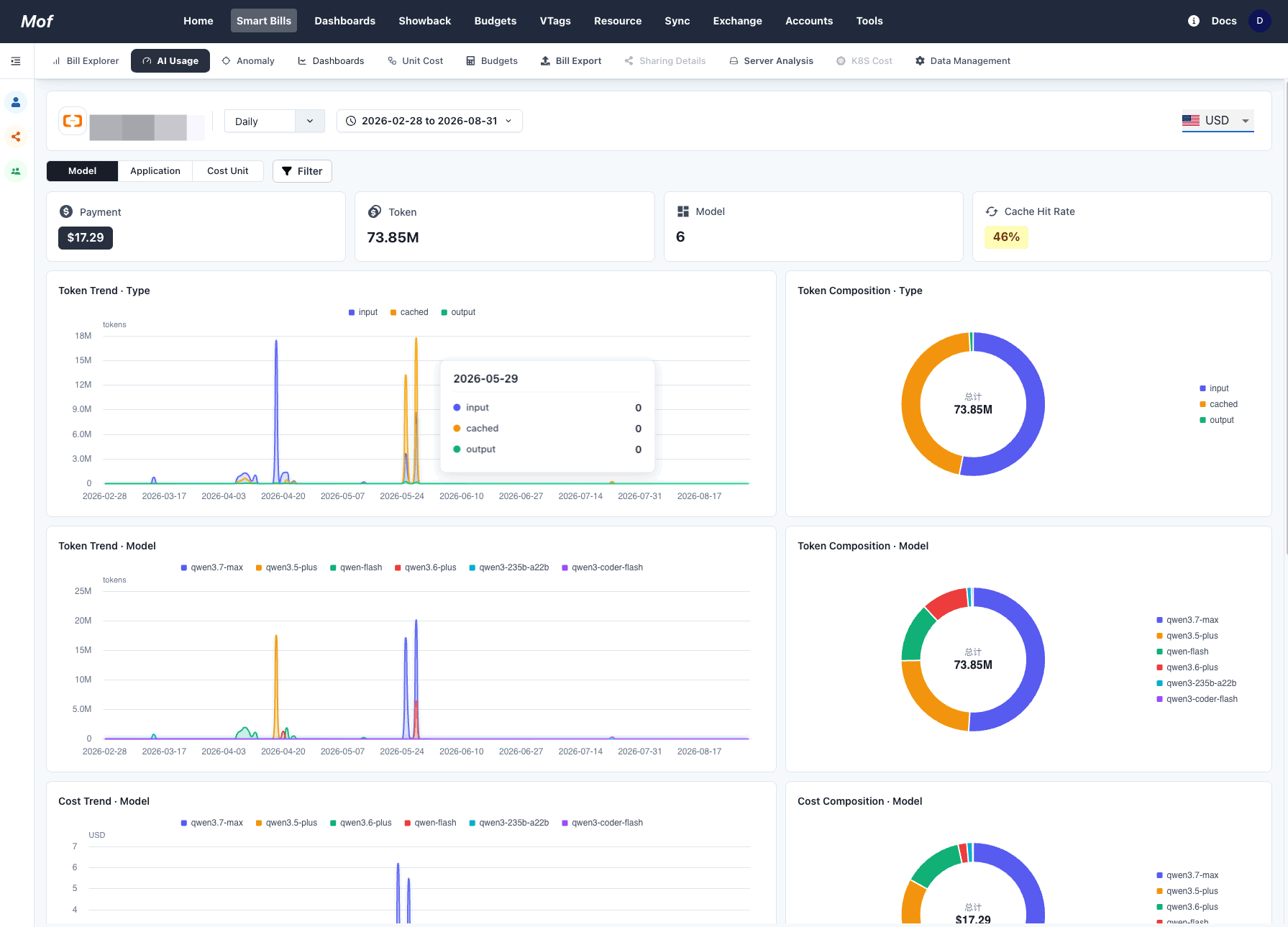
MOF reads your Alibaba Cloud bill, recognizes Bailian’s AI services, and parses each line by model / application / token type. At the top, you get four numbers at a glance — Payment, Token, Model count, and Cache Hit Rate — and from there you drill:
- By Model: which model burns the most (qwen3-max? qwen3-coder-flash?) — so you know what to route to a cheaper tier.
- By Application: which app or agent spends the most, mapped to a real workload.
- Input / cached / output split: how good your cache hit rate is (cached tokens are much cheaper) and whether output tokens are the real cost driver — that tells you where to optimize.
- By Cost Unit: give each team or cost center a clean number for their AI spend.
What each cut answers:
| Break it down by | The question it answers |
|---|---|
| Model | Which model costs the most, and what to route to a cheaper model |
| Application | Which workload / agent is spending |
| Input / cached / output | How much cache saves, whether output is the driver |
| Cost Unit | What each team / cost center spent |
Not just Bailian: same for the others, unified across platforms
If Bailian isn’t the only thing you run:
- Volcengine (Doubao), Huawei, Tencent, and Baidu Qianfan AI token usage connects and breaks down the same way;
- Multiple Bailian accounts — or Bailian + Volcengine + Qianfan together — roll up across accounts and platforms into one view, so you’re not hopping between consoles;
- Expanding overseas and also on OpenAI / Claude? Those come into the same picture too.
Not just AI: tokens are one line on the bill
As hot as AI tokens are, they’re still just one item on your cloud bill. MOF is a cloud cost platform first: Alibaba, Tencent, Huawei, Volcengine, Baidu, plus AWS / Azure / GCP in one view — compute, storage, network, databases, and yes, AI tokens. So you see AI spend in the context of the whole bill, not as an isolated token count.
How to connect Bailian
Add your Alibaba Cloud account in MOF (access key with billing read permission). Once the bill syncs, Bailian usage shows up under AI Usage, ready to slice by any of the dimensions above.
One practical tip
- Watch two numbers: output-token share and cache hit rate — they move unit cost the most;
- Cache the high-frequency, cacheable prompts; route simple tasks to a cheaper model;
- Set cost alerts by app / team so a spike reaches you early — not at month-end.
FAQ
Bailian’s bill is one number — can it really be broken down? Yes. MOF splits it by model / application / token type, and attributes it by cost unit to a team.
Is Bailian the only platform supported? No. Volcengine (Doubao), Huawei, Tencent, and Baidu Qianfan are supported too, unified across accounts and platforms.
Is it only AI tokens? No. MOF is a cloud cost platform — AI tokens are one item, seen alongside your whole cloud bill.
Can multiple Bailian accounts be combined? Yes, rolled up across accounts.
Current as of August 2026. Each cloud’s AI billing fields and console features may change over time — check against your own environment.
Related
All your multi-cloud costs, in one place
The dashboard is ready to self-host; the cloud architect Agent is coming — join the waitlist for early access.