Showback vs chargeback: how to map cloud costs to teams across AWS, Azure, Google Cloud and Chinese clouds
Showback shows teams what they spend; chargeback bills them for it. How each cloud supports cost allocation as of November 2026, including Alibaba Cloud, Tencent Cloud and Huawei Cloud, how to split shared costs, and how to do showback for virtual desktops.
 MofCloud
Nov 18, 2026 · 8 min read
Showback shows each team the cloud cost it caused; chargeback moves that cost into the team’s budget. Both rest on the same thing: an allocation that people agree is fair. Start with showback, and move to chargeback only once teams stop arguing about the numbers.
This guide covers the difference, what each cloud gives you for allocation as of November 2026 (the Chinese clouds are further along here than most people expect), the three problems every allocation runs into, and how to do showback for virtual desktops, where costs map to people rather than projects.
What is the difference between showback and chargeback?
| Showback | Chargeback | |
|---|---|---|
| What happens | Teams see the cost attributed to them | The cost is booked against their budget |
| Money moves | No | Yes, through finance |
| Needs | An allocation teams can read | An allocation teams accept, plus budgets per team |
| Main risk | Nobody acts on a report | Disputes over how shared costs were split |
| When | From day one | After a few months of showback without disputes |
The FinOps Foundation treats showback as something every practice needs and chargeback as a choice that depends on how your company does accounting. In both cases, allocation is the foundation: deciding which team owns each line of the bill.
In one line: showback is a report, chargeback is an accounting entry, and both are only as good as the allocation underneath.
What does each cloud give you for allocation?
Every provider lets you group cost by account, project or tag. They differ in two places that matter for chargeback: whether they can split shared costs, and whether a rule or tag applies to bills you already have.
| Cloud | Allocation tools | Shared-cost split | Applies to past bills? |
|---|---|---|---|
| AWS | Cost allocation tags, Cost Categories, Billing Conductor (pro forma) | Split charge rules: proportional, fixed % or even | Tags can be backfilled up to 12 months; split results don’t reach CUR |
| Azure | Tags, tag inheritance, cost allocation rules | Even, by total, compute, storage or network cost, or custom % | Tag inheritance and rules apply back to the start of the current month |
| Google Cloud | Projects, labels; GKE cost allocation | None built in; GKE leaves kube:unallocated for you to split |
Labels apply from the date they’re added |
| Alibaba Cloud | Cost tags (费用标签), financial units (财务单元), split bills | Shared-cost rules in financial units (even, proportional or custom); split bills divide shared bandwidth, OSS and CDN per resource | Cost tags apply from the next day, not to past bills |
| Tencent Cloud | Cost allocation tags (分账标签), cost allocation units (分账单元) | Apportionment rules: equal, proportional or custom % | Unit rules can be re-run up to 12 months back |
| Huawei Cloud | Enterprise projects, cost tags (成本标签), cost groups | Splits for unallocated cost; CDN and shared bandwidth split by usage | Cost tags don’t apply before activation |
| Volcengine | Cost tags, resource projects, split bills | Split bills break shared items down per resource (e.g. per EIP or bucket) | Split data starts from the month you enable it |
Two things stand out.
AWS and Azure leave chargeback to you. AWS split charge results show up only on the Cost Categories page; they don’t flow into the Cost and Usage Report or Cost Explorer. Azure’s own documentation says chargeback happens in your organization, outside Azure. Billing Conductor is AWS’s one native way to produce a re-priced, per-group bill.
The Chinese clouds have more built in. Alibaba’s financial units, Tencent’s cost allocation units and Huawei’s cost groups are rule trees with shared-cost splitting, and their split bills already break shared bandwidth, object storage and CDN down to the resource. If you run on Alibaba or Tencent, you can get further with native tools than on AWS. The catch is that each works only inside its own cloud.
Why is cost allocation hard across clouds?
Three problems come up in almost every allocation project.
1. Bills from before you tagged
Tags fix the future, not the past. Google Cloud labels and Alibaba and Huawei cost tags apply only from when you add or activate them; AWS can backfill up to a year, and only where the tag was on the resource at the time. So the quarter you most want to explain is usually the one with the worst tags. You need rules that work without tags, by account, project, service or resource name, and that can be applied to earlier months.
2. Shared costs
NAT gateways, shared bandwidth, a shared Kubernetes cluster, support plans, data transfer: none of these belong to one team. The FinOps Foundation describes three ways to split them: a fixed ratio, proportionally to each team’s other spend, or by a proxy such as requests or CPU. Early on, many companies simply fund them centrally and leave them out of team numbers. Whatever you choose, write it down, because shared costs are where chargeback disputes start.
3. The same team on several clouds
A data team might run BigQuery on Google Cloud and ECS on Alibaba Cloud. Native tools stop at each provider’s edge, so the team gets two partial numbers in two currencies. Cross-cloud allocation needs one set of team names applied to every account, plus the currency rules from our guide to multi-cloud billing.
How do you do showback for virtual desktops (VDI)?
Virtual desktops are a common showback request because finance wants the cost per employee or per department. How easy that is depends on whether each desktop belongs to one person.
| Service | How it’s billed | How to attribute cost to a person or team |
|---|---|---|
| AWS WorkSpaces Personal | Monthly per desktop (AlwaysOn) or a small monthly fee plus hourly (AutoStop) | Tag each WorkSpace with the user and department; new tags reach cost reports from the next month |
| AWS WorkSpaces Pools | Hourly, plus a per-user Windows license fee for anyone who connects that month | Pools are shared, so per-user cost needs session data, not just the bill |
| Azure Virtual Desktop | The underlying VMs, disks, storage and network, plus per-user licensing | Tag host pools; pooled, multi-session hosts give you cost per pool, not per user |
| Alibaba Cloud Wuying (无影) | Monthly hour packages (120 or 250 hours, or unlimited) or pay-as-you-go | Tag each cloud desktop, then allocate with cost tags or financial units |
| Tencent Cloud Virtual Desktop | Monthly subscription or pay-as-you-go | By account or project; check how desktop tags carry into split bills |
| Huawei Cloud Workspace | Yearly/monthly or pay-per-use by running time | Tag desktops; check whether your desktops can sit in an enterprise project |
The rule of thumb: dedicated desktops map cleanly to a person through a tag; pooled desktops map to a pool, and splitting a pool among users means weighting it by session hours from the desktop service’s own logs. Two more details catch people out: hour packages and monthly subscriptions are prepaid, so amortize them like any other prepaid resource, and on Wuying unused hours don’t roll over, so a lightly used desktop on a 250-hour plan costs the same as a busy one.
How to set up showback in Mofis
Mofis does allocation on top of the bills it already reads from each cloud, so one structure covers every account:
- Organizations and cost centers. Build your team structure once, nested if you like, and bind accounts from any cloud to it, for example AWS and Alibaba Cloud in the same organization.
- By dimension or by resource. Filter cost rows by service, region or tag and assign them to a team, or split a shared row across several teams by percentage.
- Virtual tags. Define team, environment or project values in Mofis without touching the tags on your cloud resources. They work across clouds and accounts, show how much of each account is covered, and can be filled in for past months, which is exactly the untagged-history problem above.
- Rules per billing period. Each month keeps its own rules, and you can copy them forward.
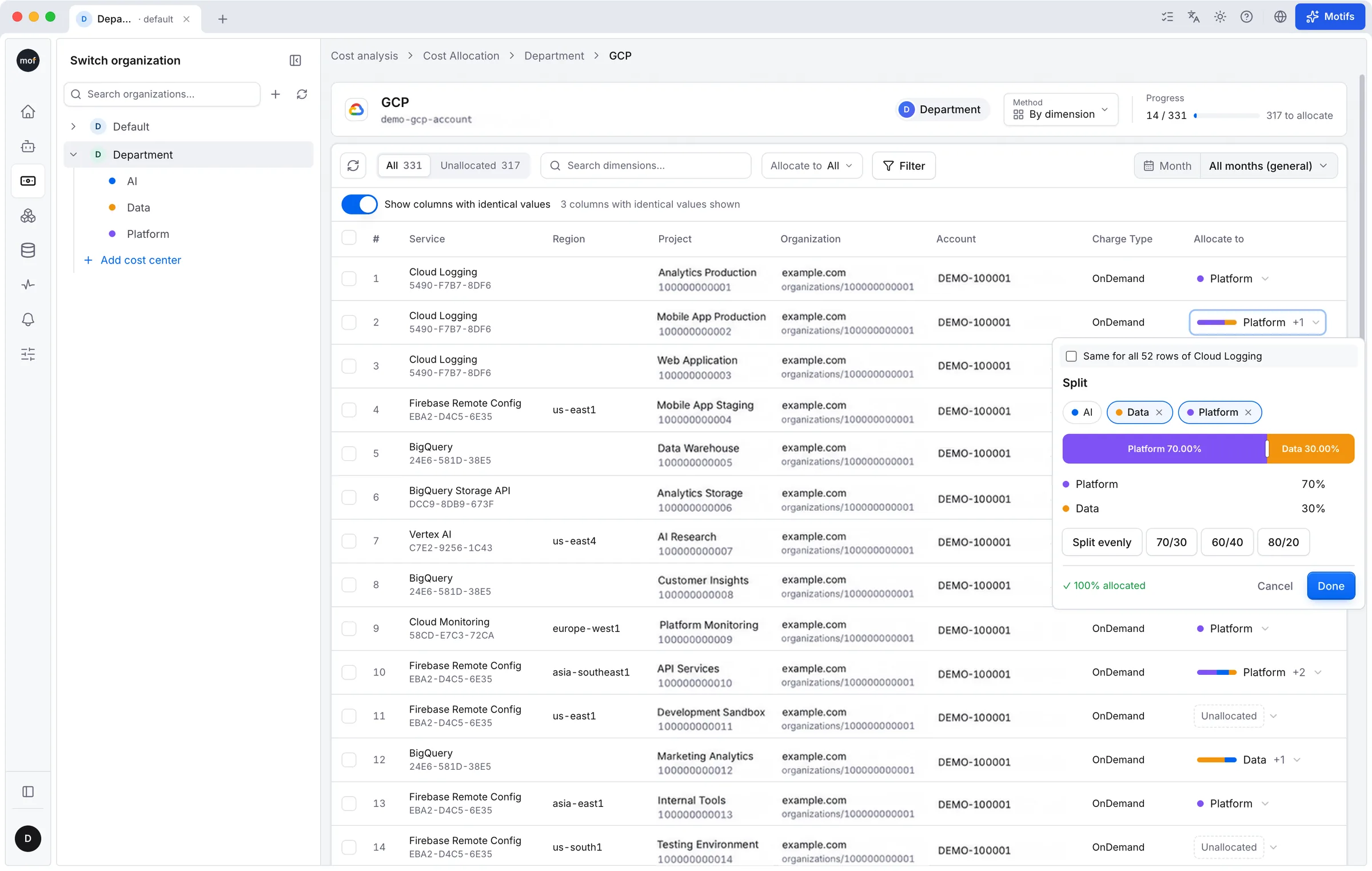
Allocating cost rows in Mofis: each line goes to a team, a shared line is split 70/30, and the progress bar shows how much is still unallocated.
Where it stops: Mofis allocates what’s in the bill. For pooled virtual desktops, per-user numbers still need session data from the desktop service.
From showback to chargeback: a checklist
- Agree on the team list and who owns each account, project and shared service.
- Allocate by account and project first, then by tag. Track the unallocated share and shrink it month by month.
- Write down the shared-cost rules, including what you fund centrally.
- Publish showback monthly to every team lead, with the same numbers finance sees.
- Run it for a few months. When disputes stop, the allocation is ready for chargeback.
- Move to chargeback with finance: map teams to budgets and decide what happens to unallocated cost.
FAQ
What’s the difference between showback and chargeback?
Showback reports each team’s cloud cost without moving money. Chargeback books that cost against the team’s budget. Showback comes first; chargeback needs an allocation everyone accepts.
Which platform maps cloud costs to teams?
Each cloud has its own tools, such as AWS Cost Categories, Azure cost allocation rules, Alibaba Cloud financial units and Tencent Cloud cost allocation units. They work inside one cloud. To map one team’s cost across several clouds, you need a cross-cloud tool, such as a FinOps platform or Mofis.
How should shared cloud costs be split?
By a fixed ratio, proportionally to each team’s direct spend, or by a usage proxy such as requests or CPU. Many companies fund shared platforms centrally at first. Pick one method per shared cost and document it.
Can I allocate costs from before we tagged resources?
Partly. AWS can backfill cost allocation tags up to 12 months where the tags existed, and Tencent Cloud can re-run allocation unit rules up to 12 months back. Google Cloud labels and Alibaba and Huawei cost tags don’t apply to the past. Rules based on accounts, projects or resource names, or virtual tags you can fill in for earlier months, cover the gap.
How do I show back virtual desktop costs per user?
Give each dedicated desktop a user and department tag and allocate by tag. For pooled desktops, split each pool’s cost by session hours from the desktop service’s logs.
Want team-level cost across every cloud you use? Mofis is free for one person, with a 14-day Pro trial and no card required.